 XRT
XRTXRT: one operator, one robot
XRT (eXtended Reality Teleoperation) is the framework. A single XRT station connects one operator in a Meta Quest 3 to one robot. It is not tied to a particular robot, and it is what this page documents. Our dual-humanoid study runs two of these stations together; that synchronization layer is described there.
One station, end to end
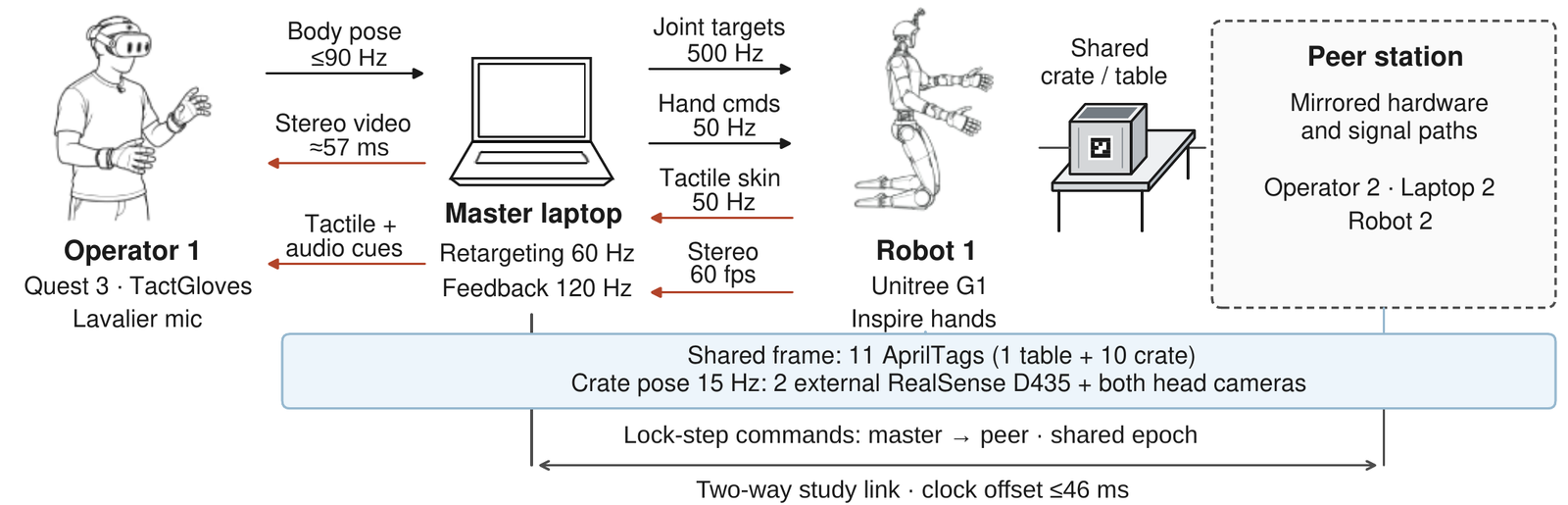
The operator's headset streams tracked body pose to a laptop, which retargets it onto the robot and sends joint, hand and neck commands. The robot returns stereo video and tactile-skin readings; the laptop streams contact intensities to the headset, which renders them as cues on the operator's glove and speakers. In the figure, everything left of the dashed box is one XRT station. The dashed peer station and the lock-step link exist only in the two-operator study.
Pose in, commands out
Body tracking
The Quest 3's onboard cameras provide markerless hand and upper-body tracking (Meta Movement SDK, inside-out body tracking). The headset streams an 84-bone pose over an unreliable, unordered WebRTC data channel at up to 90 Hz; streaming channels are kept unreliable because reliable SCTP head-of-line-blocks on Wi-Fi loss.
Retargeting
At 60 Hz the laptop solves each 7-DoF arm from body-frame shoulder, elbow and wrist positions plus wrist orientation with the closed-form geometric solver SEW-MIMIC. Joint targets stream at 500 Hz (DDS on the Unitree G1), finger angles from the tracked hand at 50 Hz, and head yaw and pitch drive a two-axis neck gimbal.
Video
A ZED Mini on the robot's neck gimbal streams HD720 stereo at 60 fps through a local relay (MediaMTX, WHEP) into a stereo shader in the headset (90°×60° field of view). Estimated from measured network, buffering and actuation terms plus assumed capture and display terms, video glass-to-glass latency averaged 57 ± 3 ms over 128 attempts and motion-to-motion teleoperation latency 87 ± 9 ms over 120 attempts in the study.
Safety layers
- Pose hold on lost tracking, and a pause when the headset is removed
- Current-triggered compliance and an emergency stop
- Head keep-out zone and a shoulder abduction clamp
Contact feedback: one signal, two displays
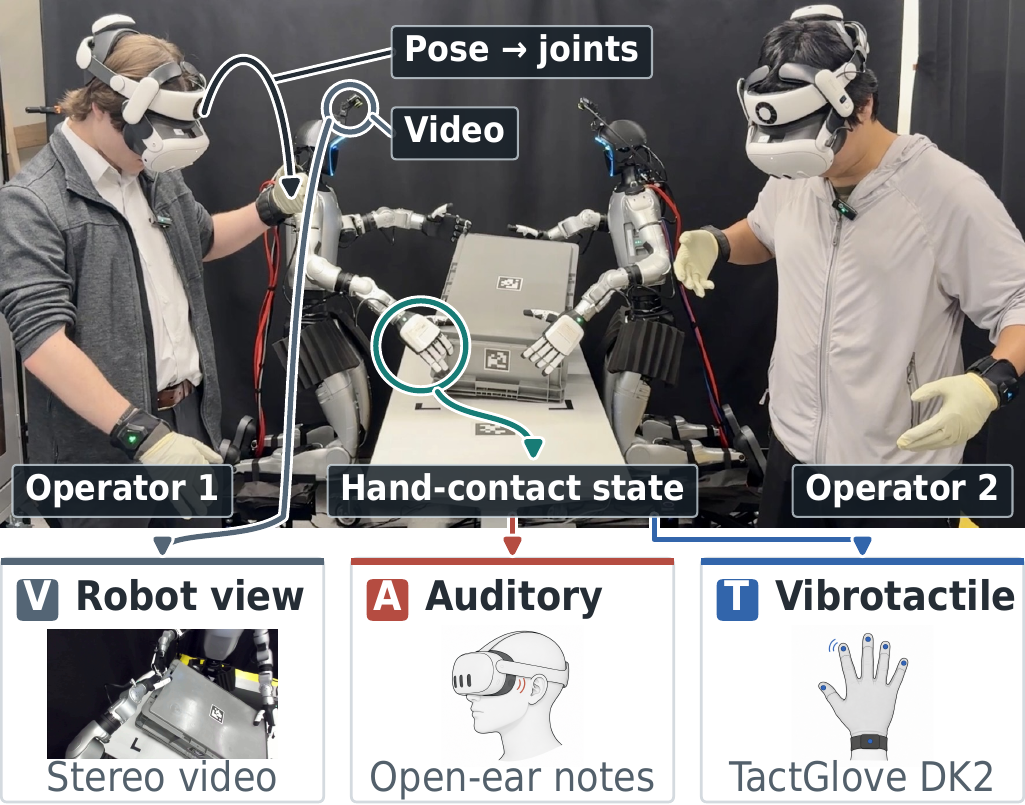
Each robot hand (Inspire RH56DFTP) has a tactile skin. Each of twelve regions per robot is reduced to one number (the peak of its fingertip and nail patches, or the palm mean), baseline-subtracted, gated at a calibrated noise floor and normalized. The result encodes contact state (which finger, when, how strongly, and when released), not calibrated force.
One four-level quantizer feeds both displays, so the cues carry the same contact signal and differ only in rendering:
- Vibrotactile: a bHaptics TactGlove DK2 fires one burst on the matching finger's actuator at each level change (palm contact uses the wrist motor).
- Auditory: a 125 ms bell from the Quest 3's open-ear speakers. Pitch names the finger; octave and loudness code the level; releases play the reversed bell an octave lower.
f(n) = 130.81 · 27n/12 Hz, n = 0…5 (palm → little finger)
| Activation band | Light | Medium | High | Maximum |
|---|---|---|---|---|
| Normalized activation | 0.10–0.35 | 0.35–0.60 | 0.60–0.85 | 0.85–1 |
| Glove amplitude (of 100) | 10 | 25 | 50 | 70 |
| Glove pulses (20 ms) | 1 | 1 | 1 | 2 |
| Bell octave (upward) | 0 | +1 | +1 | +2 |
| Bell loudness (relative) | 0.10 | 0.35 | 0.60 | 0.85 |
Intensities stream to the headset at 120 Hz, where both displays quantize them into the same four bands; the sonification adds exponential smoothing (0.80) and hysteresis (0.05).
Hardware we used
On the operator side, XRT uses a headset, gloves and one laptop; the robot side below is what our station used.
Meta Quest 3 + TactGlove DK2
Inside-out body and hand tracking, open-ear speakers, bHaptics glove with fingertip and wrist actuators. A facial fan reduces visually induced motion sickness.
Unitree G1 EDU+ with Inspire hands
7-DoF arms, Inspire RH56DFTP tactile-skin hands, and a two-axis Dynamixel neck gimbal with a ZED Mini stereo camera.
Laptop + Wi-Fi 6E
One laptop per station runs retargeting, video relay and feedback; headsets connect over a Wi-Fi 6E LAN.
Code
XRT-Client
The headset app. It streams upper-body and hand pose (Meta Movement SDK) over WebRTC and receives video, contact cues and robot telemetry back. Two video modes: FPV (stereo camera over MediaMTX WHEP) and Webcam (passthrough plus a mono stream, with on-device AprilTag tracking). Contact cues play as audio haptics, always available, and optionally on a bHaptics TactGlove.
proj_XRT
The XRT application for a G1 with Inspire tactile hands, and the stack used in the paper: the operator manager (single-operator mode, or the dual-operator study with lock-step peer link), tactile-skin-to-cue streaming, crate tracking, synchronized take recording and MuJoCo digital-twin replay. Study recordings are not public.
XRT_devices
The receiving end of XRT-Client: the WebRTC headset receiver (optionally in its own process), body-pose CSV recording and CSV/BVH playback, MediaPipe camera tracking, the skeleton and coordinate conventions, and the ZED/MediaMTX video launcher.
g1_teleop + geo_kin_core
The G1 base that proj_XRT builds on: robot models, MuJoCo simulation and real-robot control of a Unitree G1, driven by the
closed-form SEW-MIMIC retargeter in geo_kin_core.
XRT-Client: original author Yunho Cho; contributors Austin Graves, Chuizheng Kong, Sundhar Vinodh Sangeetha, mjaychoi and iaweebowo.
Quick start
- Download
XRT-Client-v<version>.apkfrom the latest XRT-Client release (no Unity needed; bHaptics glove support is built in). - Enable developer mode on the Quest 3, connect it over USB and install the APK with Meta Quest Developer Hub
(drag and drop) or
adb install -r XRT-Client-v<version>.apk. On the headset, open Library → Unknown Sources → XR Robot Teleop Client.
If an older build signed with a different key is installed, uninstall it first
(adb uninstall com.GTSafeRoboticsLab.xrteleopclient). To modify the app, build from source: see the
build guide (Unity 6000.3.11f1, Git LFS).
- Start a robot-side peer on a computer the headset can reach. For the full XRT application on a G1 with Inspire hands (contact cues included), install proj_XRT and start it without sending hardware commands:
git clone --recurse-submodules https://github.com/Euler-Rodrigues-Lab/proj_XRT.git
cd proj_XRT && uv sync --locked --python 3.12
python -m projects.inspire_hand_teleop.demo_g1_inspire_xr_robot_teleop_full_body_hw --dry_run
Drop --dry_run and add --net <interface> for the real robot, or run the operator manager
(projects.inspire_hand_teleop.XRT_user_study_manager). For retargeting alone in simulation, use
g1_teleop: python -m g1_teleop.demos.teleop_xr --device xrt --hand inspire.
No robot? pip install xr-robot-teleop-server and run one of its examples (e.g.
visualize_body_pose.py) to see the pose arrive.
- In VR, open IP Address and enter the computer's IP. Power connects; Play starts teleoperation and pose streaming, and pressing it again pauses. Across networks, use a VPN such as Tailscale.
- Inspect the incoming skeleton in the pose viewer, or record and replay it with XRT_devices.
Data-channel reference
The headset holds two independent WebRTC connections: a teleoperation link to the robot-side peer (data channels below,
single-shot HTTP offer to :8080/offer) and a receive-only video link (WHEP in FPV Mode). XRT-Client creates every data
channel, including the ones the peer sends on. Rates are those of the study build.
| Channel | Direction | Delivery | Payload | Rate |
|---|---|---|---|---|
body_pose | headset → peer | unreliable, unordered | 84 bones × (id, position, quaternion), binary | ≤90 Hz |
apriltag_pose | headset → peer | unreliable, unordered | tag poses, same binary layout (Webcam Mode only) | not used in the study |
camera | headset → peer | reliable, ordered | head yaw, pitch, roll (JSON) | per frame |
unity_state | headset → peer | reliable, unordered | teleop state (teleop_active), latency pongs | on event, 2 Hz |
haptics | peer → headset | unreliable, unordered | per-finger contact intensities (JSON) | 120 Hz |
unity_cmds | peer → headset | reliable, unordered | commands: haptics toggles, viewport, teleop_active, latency_ping | on event |
motor_stats | peer → headset | unreliable, unordered | arm temperatures and torques (inactive in the study build) | 10 Hz |
A stock server that ignores a channel just logs it as unhandled. Full details are in the XRT-Client README.